
Most companies do not have a data shortage. They have a clarity shortage. McKinsey reports that 71% of consumers expect personalized interactions and 76% get frustrated when they don’t get them, yet plenty of teams still can’t say why a customer churned last month.
This guide is for marketers, product managers and founders who need to pick one of the best customer analytics platforms without burning a quarter on demos. Short answer first: Amplitude and Mixpanel lead for behavioral analytics, Google Analytics 4 is the strongest free starting point, Adobe Customer Journey Analytics and Salesforce Data 360 suit large enterprises, and PostHog is the pick for developer-led startups. The right choice depends on your data maturity, not on whose demo looked slicker.
Key Takeaways
- GA4, PostHog, Amplitude and Mixpanel all offer free tiers generous enough to validate your tracking plan before you spend anything.
- Behavioral tools (Amplitude, Mixpanel, Heap) answer “what are users doing?” A CDP like Segment answers “is our data clean and in one place?”
- Enterprise suites earn their price only when you need to stitch online, offline and call-center data.
- AI features are now standard. Data quality is still the real bottleneck.
- Indian businesses should shortlist vendors with clear consent controls ahead of full DPDP Rules enforcement.
What Is a Customer Analytics Platform?
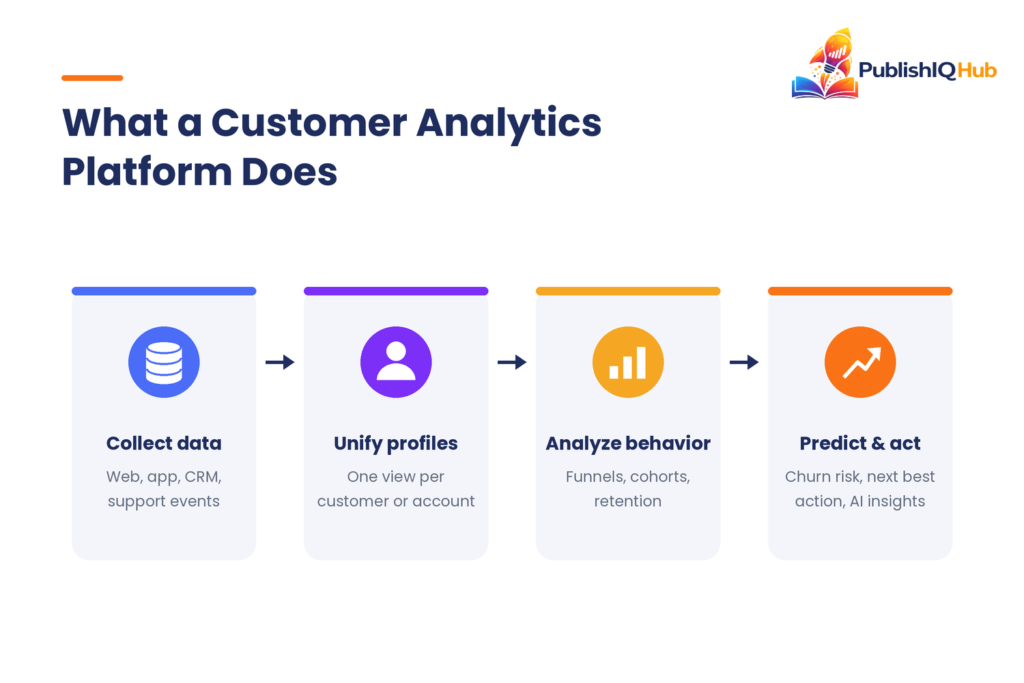
A customer analytics platform is software that collects customer interaction data from websites, apps, CRM and support channels, connects it to individual users or accounts, and turns it into insight about acquisition, engagement, conversion, retention and lifetime value. The goal is to explain customer behavior and predict what customers will do next.
That definition covers a wide spread of products. Some customer analytics tools focus on events inside a product (clicks, sign-ups, feature usage). Others focus on the full customer journey across channels. A third group, customer data platforms, mostly exists to collect and clean the data that analysis tools then use.
In practice, the category boundaries blur every year. Amplitude now ships session replay. Segment ships audiences. GA4 ships predictive metrics. So instead of asking “which category do I need?”, ask “which question am I trying to answer this quarter?”
Why Customer Analytics Tools Matter More in 2026
Three shifts have raised the stakes.
AI raised expectations and exposed bad data. In Twilio Segment’s 2024 State of Personalization Report, 89% of business leaders said personalization is key to their success over the next three years. The same report found 61% of companies worry that inaccurate data will undermine AI and machine learning for personalization. AI-powered customer analytics is only as good as the event data underneath it. If your team is still fixing duplicate records by hand, a look at specialist data cleansing companies may pay off before any new tool does.
Customers are more protective of their data. Salesforce’s State of the AI Connected Customer research found 71% of customers feel increasingly protective of their personal information, and 64% believe companies are reckless with customer data. Consent-aware, first-party analytics has moved from a legal checkbox to a trust signal.
Regulation now has deadlines. India’s Digital Personal Data Protection Rules were finalized on 13 November 2025, with most obligations taking effect 18 months later, according to the IAPP. Add GDPR in Europe and CCPA in California, and your vendor’s consent management, data residency and deletion features matter as much as its dashboards.
There’s also a quieter point. Personalization done carelessly backfires. A Gartner survey of 1,464 buyers found 53% of customers had experienced negative effects from personalization, and those customers were 44% less likely to buy again. Good analytics tells you when to stop, not just when to push.
How We Evaluated These Platforms
We reviewed the customer analytics tools below against their current documentation and pricing pages in September 2026 and scored them on six criteria:
- Data integration: SDKs, warehouse connections, CRM and ad-platform connectors.
- AI and predictive features: natural-language querying, anomaly detection, churn or purchase predictions.
- Ease of use: can a marketer build a funnel without filing a ticket?
- Pricing transparency: is there a free tier, and can you estimate cost before talking to sales?
- Scalability: how cost and performance behave at tens of millions of events.
- Privacy and compliance: consent tooling, data residency, deletion workflows.
No single tool wins on all six. That’s the honest headline.
The 10 Best Customer Analytics Platforms in 2026
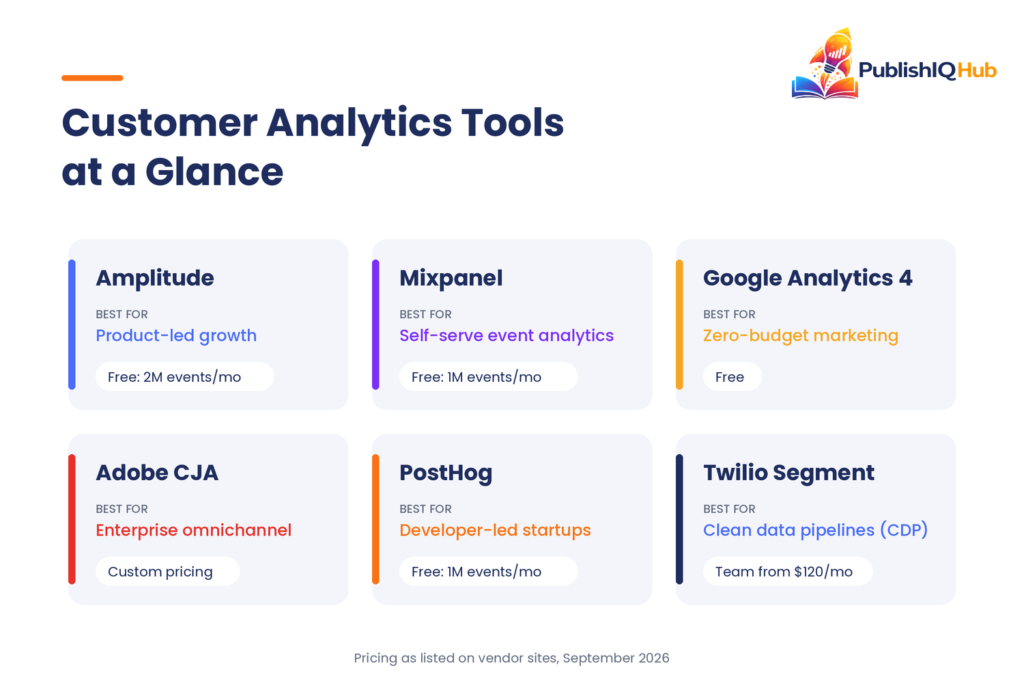
These are the best customer analytics platforms we’d shortlist today. Pricing below is as listed on vendor sites in September 2026. Usage-based prices move often, so confirm before you budget.
1. Amplitude
Best for: product-led companies that want deep behavioral analysis with AI built in.
Amplitude is the most complete behavioral analytics suite on this list. It tracks events, builds cohorts, and connects product usage to retention and revenue. The current lineup puts AI agents and an MCP connection on every plan, so teams can query data from AI assistants they already use.
- Funnels, retention and path analysis with behavioral cohorts
- AI agents available on all plans, including Free
- Session replay on Growth and Enterprise
- Unlimited seats on every plan
Pricing: Free plan with 2 million events per month. Plus scales with usage after that. Growth and Enterprise are custom. See Amplitude pricing.
Pros: depth of analysis; generous free tier; strong experimentation add-ons.
Cons: steep learning curve; costs climb quickly at high event volume.
2. Mixpanel
Best for: small and mid-size teams who want fast, self-serve event analytics.
Among customer analytics tools, Mixpanel’s strength is speed. Reports load quickly, the interface is friendlier than Amplitude’s, and non-analysts get answers without SQL. For a 20-person D2C brand in Pune tracking repeat purchases, Mixpanel’s free plan covers the first year comfortably.
- Real-time funnels, flows and retention
- Experiments and feature flags included at baseline
- Group analytics for B2B account-level views (paid add-on)
Pricing: Free up to 1 million events per month (5 saved reports per user). Growth includes the first 1 million events free, then about $0.28 per 1,000 events. MTU-based Enterprise starts at $20,000 per year, per Mixpanel’s pricing docs.
Pros: easy to adopt; transparent pricing.
Cons: add-ons raise the real bill; weaker for marketing attribution.
3. Google Analytics 4
Best for: website and marketing teams starting on a zero budget.
GA4 is the default for a reason. It’s free, it plugs into Google Ads, Search Console and BigQuery, and it’s the easiest entry point into predictive customer analytics. The GA4 predictive metrics cover purchase probability, churn probability and predicted revenue, provided your property meets the data thresholds.
- Event-based tracking across web and app
- Predictive audiences you can push straight to Google Ads
- Free BigQuery export for raw data
Pricing: free. Analytics 360 (enterprise) is custom-priced.
Pros: no cost; tight Google ecosystem fit.
Cons: data thresholding hides small segments; the interface frustrates many marketers; limited user-level analysis.
4. Adobe Customer Journey Analytics
Best for: large enterprises that need one view across web, app, stores and call centers.
Adobe Customer Journey Analytics (CJA) sits on Adobe Experience Platform and stitches identities across channels, including offline sources. Its AI Assistant and Data Insights Agent let analysts ask questions in plain English and generate visualizations inside Analysis Workspace.
- Cross-channel identity stitching
- Analysis Workspace for flexible ad-hoc reporting
- Deep ties to Adobe Journey Optimizer and Real-Time CDP
Pricing: custom, typically annual enterprise contracts.
Pros: unmatched flexibility for omnichannel customer journey analytics.
Cons: expensive; needs a skilled implementation partner.
5. Salesforce Data 360 (formerly Data Cloud)
Best for: companies already running Sales Cloud, Service Cloud or Marketing Cloud.
Salesforce renamed Data Cloud to Data 360 as part of its Agentforce 360 push. It unifies CRM, commerce and engagement data into real-time profiles that dashboards and AI agents can act on. If you’re also evaluating enterprise chatbot platforms, Data 360 is what feeds Salesforce’s agents their customer context.
- Real-time unified customer profiles
- Zero-copy access to Snowflake, Databricks and BigQuery
- Segments that activate across Salesforce clouds
Pricing: consumption-based credits plus storage, per Salesforce.
Pros: native to the CRM where your sales and service teams already work.
Cons: credit-based billing is hard to forecast; limited value outside Salesforce.
6. Twilio Segment
Best for: teams that need clean, consistent data flowing into every other tool.
Segment is a customer data platform first. It collects events once and routes them to your analytics, ad and warehouse tools. Many teams pair Segment with Amplitude or Mixpanel rather than choosing between them.
- 700+ integrations
- Tracking plans and schema controls (Protocols)
- Reverse ETL from your warehouse
Pricing: Free for up to 1,000 visitors per month and 2 sources. Team starts at $120/month for 10,000 visitors. Business is custom, per Twilio Segment pricing.
Pros: fixes data plumbing once; vendor-neutral.
Cons: not an analysis tool on its own; MTU costs add up.
7. Heap by Contentsquare
Best for: teams that forgot to track something and need the data retroactively.
As customer analytics software goes, Heap is the most forgiving. Its autocapture records every click and page view without manual tagging. When a stakeholder asks a new question, you define the event today and see historical data immediately.
- Retroactive event definition
- Automated insights that surface hidden drop-offs
- Pairs with Contentsquare’s experience analytics
Pricing: Free up to 10,000 monthly sessions with 6 months of history. Growth, Pro and Premier are quoted, per Heap.
Pros: little engineering effort to start.
Cons: autocapture creates noisy data without governance.
8. Hotjar (Contentsquare)
Best for: marketers and UX teams who want to see why visitors behave the way they do.
Hotjar merged into the Contentsquare group in 2025. It still does what made it popular: heatmaps, session recordings and on-page surveys. It won’t replace an event analytics tool, but it explains the “why” behind a leaky funnel faster than any chart.
- Heatmaps and scroll maps
- Session recordings with filters
- Surveys and feedback widgets
Pricing: free plan available; paid tiers are listed on Contentsquare’s pricing page, with higher tiers through sales.
Pros: fast qualitative insight; easy install.
Cons: limited quantitative depth; plans changed after the merger, so check current limits.
9. PostHog
Best for: developer-led startups that want analytics, replay, feature flags and experiments in one place.
PostHog is open source and bundles product analytics, session replay, feature flags, A/B testing and surveys. It’s one of the best free customer analytics tools for technical teams.
- All-in-one product and customer analytics suite
- SQL access and a built-in data warehouse
- Self-host option for strict data residency needs
Pricing: free each month for 1 million events and 5,000 session recordings; usage-based after that, per PostHog.
Pros: outstanding free tier; transparent pricing.
Cons: developer-oriented interface; marketers may need help at first.
10. Pendo
Best for: B2B SaaS companies focused on feature adoption and onboarding.
Pendo combines product analytics with in-app guides, NPS surveys and roadmaps. For customer analytics tools for SaaS, it’s the natural pick when the goal is getting users to adopt features, not just measuring them.
- Product analytics tied to in-app guidance
- NPS and feedback collection
- Account-level health views for customer success
Pricing: Free up to 500 monthly active users. Base, Core and Ultimate are custom, per Pendo.
Pros: analytics and action in one tool.
Cons: pricing jumps sharply as MAUs grow.
Customer Analytics Software Comparison Table
| Platform | Best for | Key AI feature | Starting price | Free plan |
| Amplitude | Product-led growth | AI agents on all plans | Free; paid scales with events | Yes |
| Mixpanel | Self-serve event analytics | AI-assisted report building | ~$0.28 per 1K events after 1M | Yes |
| Google Analytics 4 | Zero-budget marketing teams | Purchase and churn predictions | Free | Yes |
| Adobe CJA | Enterprise omnichannel | AI Assistant, Data Insights Agent | Custom | No |
| Salesforce Data 360 | Salesforce-centric orgs | Powers Agentforce agents | Consumption credits | No |
| Twilio Segment | Data collection (CDP) | Predictive traits (paid tiers) | Predictive traits (paid tiers) $120/month | Yes |
| Heap | Retroactive analysis | Automatic friction detection | Quoted | Yes |
| Hotjar | Qualitative UX insight | AI-assisted survey insights | Paid tiers listed by Contentsquare | Yes |
| PostHog | Developer-led startups | AI assistant for queries | Usage-based | Yes |
| Pendo | B2B SaaS adoption | AI-assisted guide creation | Custom | Yes (500 MAU) |
How to Choose a Customer Analytics Platform
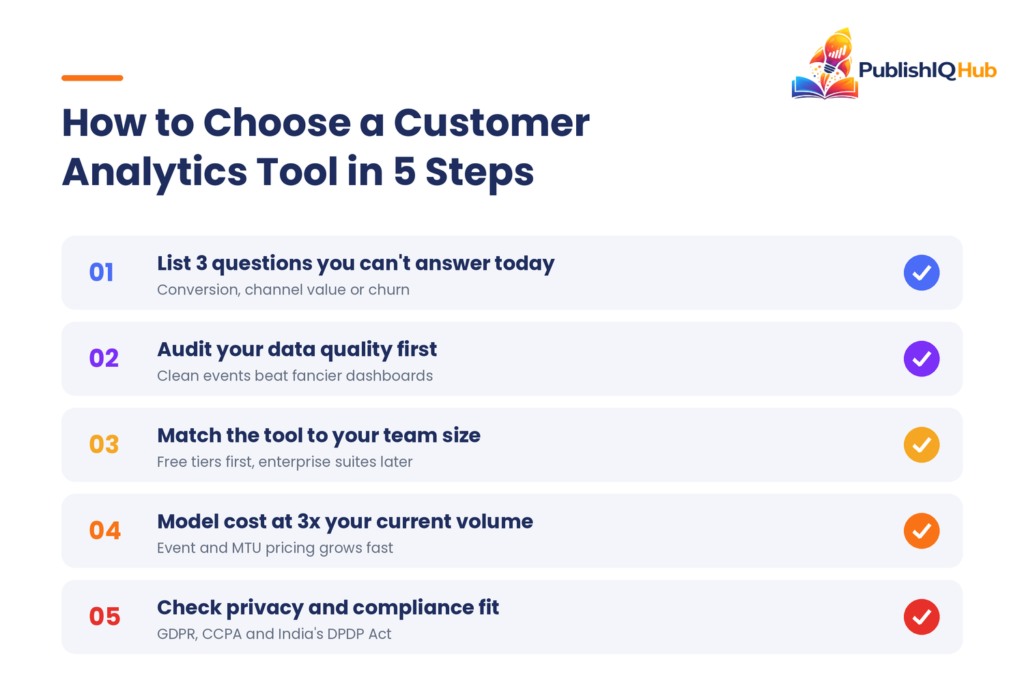
Most buyers compare customer analytics tools by feature checklist. Skip that for a moment and work through these five steps instead.
1. Write down three questions you can’t answer today. “Why do trial users not convert?” points to Amplitude, Mixpanel or PostHog. “Which channel drives our highest-value customers?” points to GA4 or Adobe CJA.
2. Audit your data before you buy. If events are inconsistent, a CDP like Segment or a tracking plan will do more good than a fancier dashboard.
3. Match the tool to team size. For the best customer analytics platforms for small business use, start with GA4 plus Mixpanel or PostHog free tiers. Mid-size SaaS teams usually outgrow that in 12 to 18 months. Enterprises with offline data need Adobe or Salesforce.
4. Model the cost at 3x your current volume. Event- and MTU-based pricing can double after one good marketing campaign. Ask vendors for a written quote at triple today’s traffic.
5. Check compliance fit. Confirm consent handling, data residency and deletion for GDPR, CCPA and the DPDP Act. For Indian fintech or lending businesses, this step isn’t optional.
A worked example: a Bengaluru B2B SaaS company with 8,000 monthly active users and a two-person growth team would likely run GA4 for acquisition, PostHog or Mixpanel for product usage, and add Segment only when a third tool enters the stack. Budget in year one: close to zero.
Predictive customer analytics also connects to finance. Churn and revenue forecasts from your analytics tool can feed the same models your CFO uses, which is why cash flow forecasting and customer analytics increasingly share one data source.
Customer Analytics vs Product Analytics vs CDP
| Customer analytics | Product analytics | Customer data platform (CDP) | |
| Main question | Who are our customers and how do they move across channels? | How do users behave inside our product? | Is our customer data unified and clean? |
| Scope | Marketing, sales, support, product | Product usage only | Data collection and routing |
| Examples | Adobe CJA, GA4, Salesforce Data 360 | Amplitude, Mixpanel, Pendo, PostHog | Twilio Segment, Salesforce Data 360 |
Most mature stacks use all three. A CDP collects the data, product analytics explains in-app behavior, and customer journey analytics connects it to revenue. B2B marketers who run content syndication programs feel this most, because lead source data usually lives in one tool and product usage in another.
Final Thoughts: Picking From the Best Customer
There is no universal winner among the best customer analytics platforms. Amplitude and Mixpanel lead on behavioral depth, GA4 wins on cost, Adobe and Salesforce win on enterprise scope, and PostHog gives startups the most for free. The companies that get value fastest aren’t the ones with the biggest tool budget. They’re the ones who define their questions first and keep their data clean.
Start small with one of the customer analytics tools above, prove one insight, then expand. If you’re planning how analytics connects to customer conversations, our guide to top AI chatbot companies and platforms is a useful next read, and you’ll find more practical AI and B2B guides across PublishIQHub.
Frequently Asked Questions
What is the best customer analytics platform for small businesses?
Google Analytics 4 is the best starting point because it’s free and covers website acquisition and conversion. Pair it with the free tier of Mixpanel or PostHog if you run an app or SaaS product. Move to paid customer analytics software only when a specific question can’t be answered.
Are there free customer analytics tools?
Yes. GA4 is free, Amplitude’s free plan includes 2 million events per month, PostHog includes 1 million events and 5,000 recordings monthly, Mixpanel includes 1 million events, and Heap offers up to 10,000 sessions. Pendo is free up to 500 monthly active users.
What is the difference between a CDP and a customer analytics platform?
A CDP collects, cleans and unifies customer data, then sends it to other tools. A customer analytics platform analyzes that data to explain behavior and predict outcomes. Segment is a CDP; Amplitude and Mixpanel are analytics tools. Many teams use both together.
How does AI-powered customer analytics work?
AI-powered customer analytics uses machine learning to spot anomalies, predict churn or purchase likelihood, and answer plain-language questions about your data. GA4 predicts purchase and churn probability, while Amplitude and Adobe CJA offer AI agents and assistants that build reports on request.
How much do customer analytics platforms cost in 2026?
Costs range from free to six figures a year. GA4 is free, Segment’s Team plan starts at $120 per month, and Mixpanel’s MTU-based Enterprise option starts at $20,000 per year. Adobe CJA, Salesforce Data 360 and Pendo’s paid plans use custom enterprise pricing.
Which customer analytics tool is best for SaaS companies?
Amplitude and Mixpanel are the strongest choices for SaaS product analytics, while Pendo is better if onboarding and feature adoption are the priority. Early-stage SaaS teams on a tight budget often choose PostHog for its free tier and all-in-one feature set.