
Quick Answer
The best AI tools for productivity in 2026 fall into five categories: writing assistants, meeting notetakers, task automation, research tools, and cross-app automation platforms. Most workers save around three hours a week. The savings come from picking two or three tools that fit your actual workflow — not from subscribing to twelve.
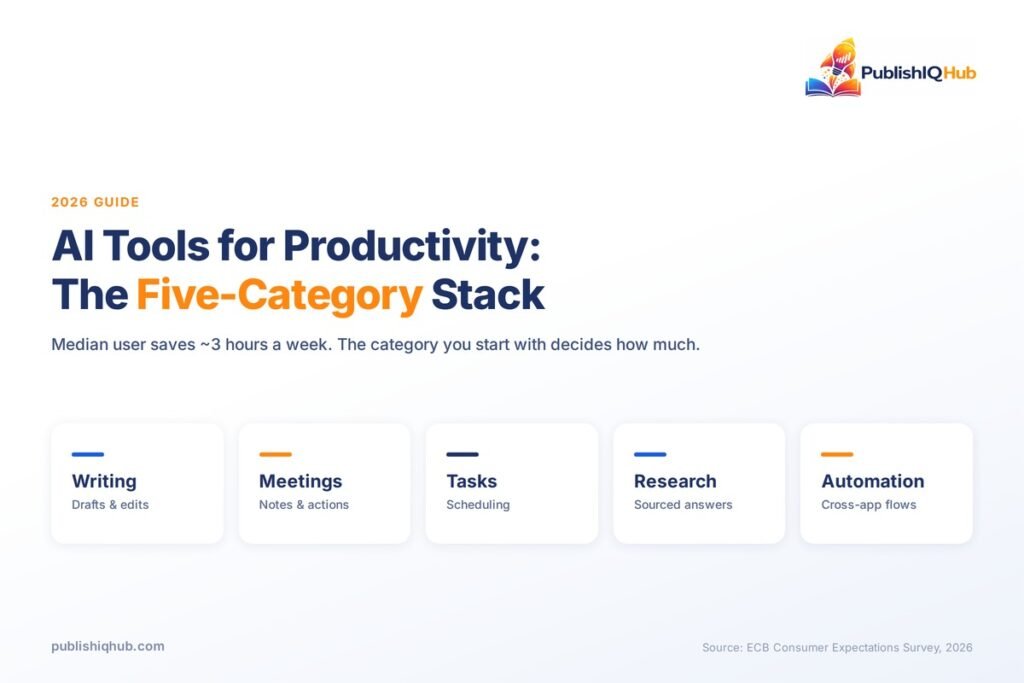
Here is a number worth sitting with. European Central Bank researchers surveyed roughly 20,000 workers across 11 countries this year and found the median AI user saves three hours per week — about 7.7% of a working week.
Three hours. Not the twenty you may have been promised.
That gap between the promise and the measured reality is why most guides to AI tools for productivity are close to useless. They list fifty products, give each one a paragraph of marketing copy, and leave you to figure out which ones survive contact with a real Tuesday. This guide works differently. Every tool here is named with its current price and one honest limitation, the statistics are linked to the studies they came from, and there is a section on what these tools still cannot do.
You will get more out of AI tools for productivity by choosing carefully than by choosing widely. That is the whole argument.
Why AI Productivity Tools Matter More in 2026 Than They Did in 2024
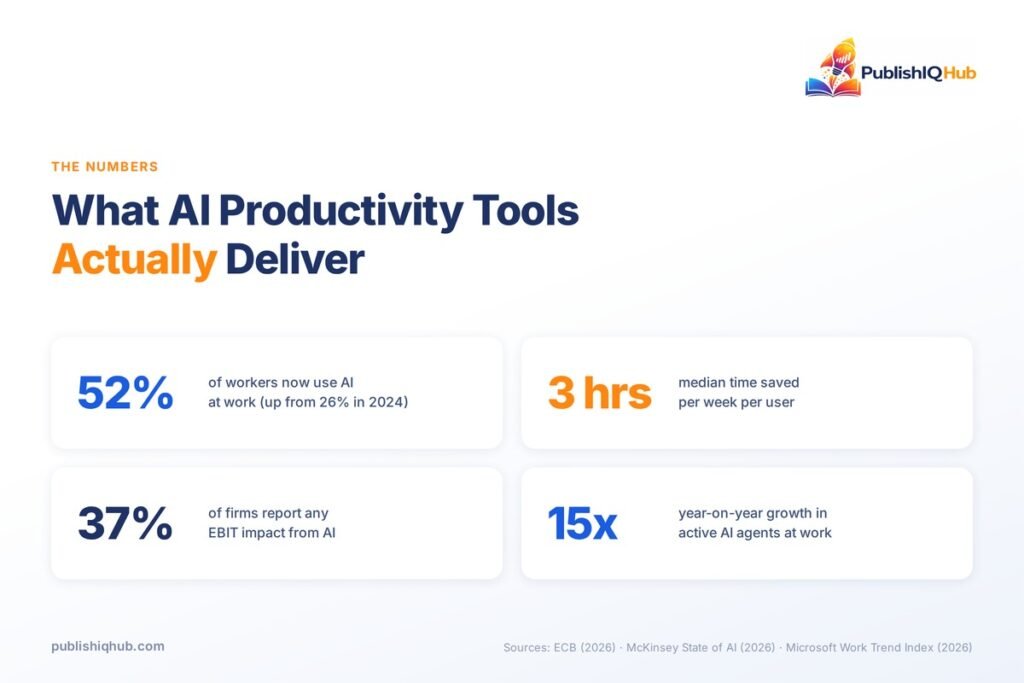
Adoption stopped being a question this year. ECB survey data shows AI use among euro-area workers climbed from 26% in 2024 to 41% in 2025 and 52% in 2026. More than half of working adults now reach for AI productivity tools roughly three days a week.
The best AI tools for work also changed shape this year. Microsoft’s 2026 Work Trend Index, based on 20,000 workers across 10 countries, reports 15x year-on-year growth in active Microsoft 365 agents — and 18x in large enterprises. Agents are the shift. Instead of a chat box you prompt, you now get software that runs a multi-step job and reports back.
But here is the catch that most coverage of AI tools for productivity skips. McKinsey’s 2026 State of AI survey found nearly nine in ten organisations use AI in at least one business function, while only 37% attribute any EBIT impact to it. Usage is near-universal. Measurable financial return is not.
So the question is no longer whether to adopt. It is which tools, in what combination, for which specific job.
The Five Categories of AI Tools for Productivity
Nearly every product in this market falls into one of five buckets. Knowing which bucket a tool belongs to tells you what it is actually replacing in your workday, and it is the fastest way to narrow a list of two hundred AI productivity tools down to three worth trialling.
Writing and content assistants replace the blank page and the first draft. This is the most mature category and the one where the time savings are easiest to feel immediately.
Meeting and note tools replace the person who used to type while everyone else talked. A decent AI meeting assistant records, transcribes, summarises, and pulls out action items without being asked. For anyone in more than ten meetings a week, this is usually the fastest payback in the entire stack.
Task and project automation replaces the twenty minutes a day you spend moving work between people, updating statuses, and rebuilding your schedule after something slips.
Research and analysis tools replace the open-fourteen-tabs phase of any piece of work. They search, synthesise, and cite.
Cross-app automation platforms replace you as the connective tissue between systems. This is the least glamorous of the five and often the highest-return. When a form submission needs to become a CRM record, a Slack message, and a calendar invite, an AI automation platform does that without you touching it.
Most people over-invest in the first category and ignore the fifth. That is backwards for anyone whose day is fragmented across systems.
AI Agents for Work: What Actually Changed This Year
The vocabulary shifted in 2026, and it is worth being precise about what the shift means, because vendors are now using “agent” to describe things that are not agents.
An assistant waits for your prompt and returns an answer. You stay in the loop for every step. An agent takes a goal, breaks it into steps, uses tools to execute them, and comes back when it is finished or stuck. The difference is who holds the sequence.
That distinction matters for how you evaluate AI productivity tools. Assistants save you minutes per task. Agents can save hours per process — when they work. When they don’t, they fail in ways that are harder to catch, because you weren’t watching the middle steps.
The adoption numbers say this is not hype. Microsoft’s 15x year-on-year growth in active agents is real usage, not licences sold. Notion now ships custom agents on a credit model. Zapier, Make, and n8n have all moved from rule-based triggers toward AI workflow automation tools that make judgement calls inside a sequence.
Practical advice: start agents on low-stakes, high-repetition work where a mistake is annoying rather than expensive. Inbox triage, meeting prep, data cleanup, first-pass research. Keep them away from anything client-facing until you have watched a few dozen runs. The teams getting value from AI agents for work earned that trust incrementally, on tasks where failure was cheap.
Best AI Tools for Work, Category by Category
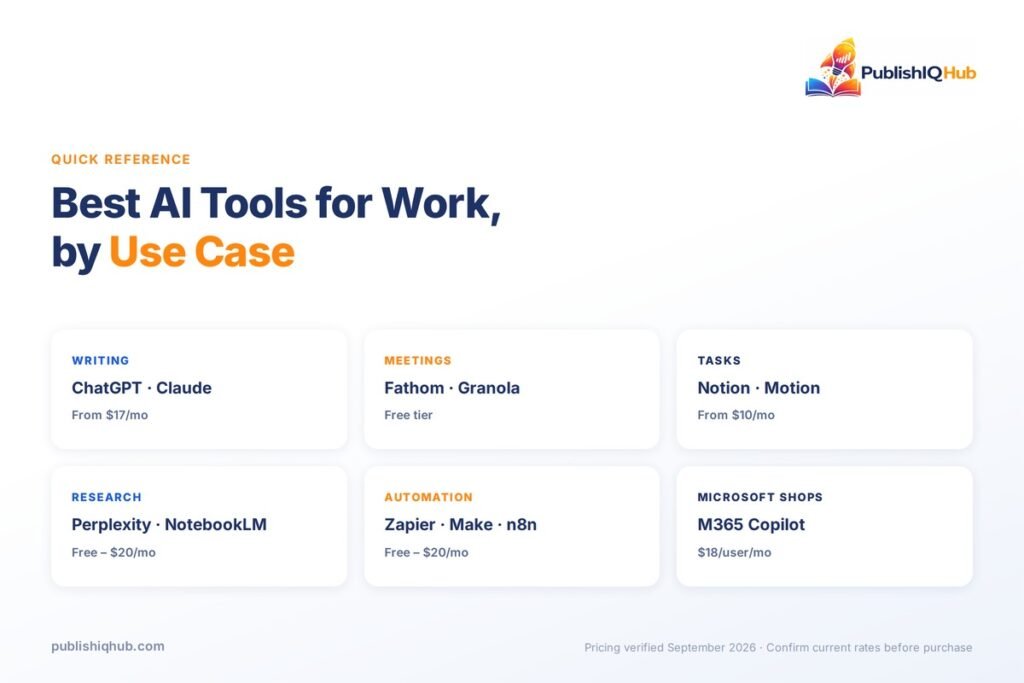
Fifteen tools, grouped by what they actually do. Pricing verified September 2026.
A note on scope before the list. These are horizontal tools — they work regardless of what your company does. Function-specific AI productivity tools are a separate and increasingly deep market, from AI HR software handling screening and onboarding to the systems running inside AI-led manufacturing operations. If your bottleneck is specific to your function, look there before you look here.
Writing and content
ChatGPT — The default general-purpose assistant, and still the one most people reach for first. Strong at drafting, restructuring, and rapid iteration. Plus runs $20/month, with Go, Business, and Enterprise tiers above and below it. Limitation: it is a generalist. For specialised work — legal drafting, financial modelling — a purpose-built tool usually beats it.
Claude — Better than most at long documents and sustained analytical work. Pro is $17/month billed annually or $20 monthly; Team seats start at $20/month annually. Limitation: smaller ecosystem of third-party integrations than ChatGPT, so it fits less neatly into existing workflows.
Grammarly — Not glamorous, and quietly one of the best AI tools for work if your output is written. Pro is $12/user/month. Limitation: its suggestions flatten distinctive voices. Writers with a real style should ignore roughly a third of them.
If your work involves visual content alongside written output, this category extends further than text — our guide to the best AI image generation tools covers that side of the stack.
Meetings and notes
Granola — An AI meeting assistant that takes notes from your own device audio rather than joining calls as a visible bot, which matters for sensitive conversations. Free tier with 30-day history; Business is $14/user/month. Limitation: Mac-first, so mixed-device teams hit friction.
Otter.ai — The established name. Basic is free with 300 transcription minutes a month; Pro is $16.99/user/month monthly or $8.33 billed annually. Limitation: accuracy drops noticeably on heavily accented speech and crosstalk, which is a real problem for distributed teams.
Fathom — The free tier is genuinely generous: unlimited recordings and transcriptions with AI summaries at no cost. Premium is $20/month ($16 annually); Team seats are $19/user/month. Limitation: CRM sync and coaching features sit behind the $34/user Business tier.
Task and project automation
Notion — AI is now included across all plans rather than sold separately. Plus is $10/user/month, Business $20. Custom agents run on credits at $10 per 1,000 monthly credits. Limitation: Notion rewards people who enjoy building systems. If you don’t, you will build an elaborate workspace and abandon it.
Motion — Rebuilds your calendar automatically when priorities shift. Pro AI is $19/seat/month, Business AI $29. Limitation: it works only if you trust it with everything. Partial adoption produces a schedule that is wrong in confusing ways.
ClickUp with Brain — ClickUp Unlimited is $7/user/month billed yearly; Brain is a $9/user/month add-on, with Everything AI at $28. Limitation: the AI is priced separately, so the sticker price and the real price diverge.
Research and analysis
Perplexity — Among AI productivity tools for research, it answers with inline citations you can actually click, which makes it the better choice when you need to verify rather than just generate. Pro sits at $20/month. Limitation: it cites confidently from weak sources. The citations tell you where a claim came from, not whether that source was any good.
NotebookLM — Google’s research tool, grounded strictly in documents you upload. Free to use. Limitation: it will not go beyond your sources, which is the point and also the constraint.
Cross-app automation platforms
Zapier — The most mature AI automation platform, with the widest app coverage. Free gives 100 tasks a month; Professional is $19.99/month, Team $69. Limitation: task-based pricing gets expensive fast once automations run at volume.
Make — More capable visual builder than Zapier for branching logic, at lower cost. Free tier includes 1,000 credits monthly; Core is $12/month, Pro $21. Limitation: the learning curve is steeper. Expect a weekend before you are productive.
n8n — Self-host the community edition for free, or use cloud from €20/month billed annually. The pick for technical teams with data-residency requirements. Limitation: you are your own support desk on the self-hosted version.
Microsoft 365 Copilot — $18/user/month billed annually, or $25.20 monthly. Worth it mainly if your organisation already lives in Teams, Outlook, and SharePoint. Limitation: quality depends heavily on how well your tenant’s data is organised. Messy SharePoint, mediocre Copilot.
Comparison Table: Best AI Tools for Productivity
| Tool | Best for | Category | Starting price | Standout feature |
| ChatGPT | General drafting | Writing | $20/mo | Broadest capability range |
| Claude | Long-document work | Writing | $17/mo annual | Sustained analysis |
| Grammarly | Editing at volume | Writing | $12/user/mo | Works inside every app |
| Granola | Private meetings | Meetings | Free / $14 | No bot joins the call |
| Otter.ai | Transcription | Meetings | Free / $8.33 | 300 free minutes |
| Fathom | Sales calls | Meetings | Free / $16 | Unlimited free recording |
| Notion | Team knowledge | Tasks | $10/user/mo | AI included in all plans |
| Motion | Calendar chaos | Tasks | $19/seat/mo | Auto-rescheduling |
| ClickUp Brain | Project tracking | Tasks | $7 + $9/user/mo | AI across every view |
| Perplexity | Sourced research | Research | $20/mo | Clickable citations |
| NotebookLM | Document synthesis | Research | Free | Grounded in your files |
| Zapier | Widest integrations | Automation | Free / $19.99 | 8,000+ app connections |
| Make | Complex branching | Automation | Free / $12 | Visual scenario builder |
| n8n | Technical teams | Automation | Free self-host | Full data control |
| M365 Copilot | Microsoft shops | Automation | $18/user/mo | Native Office integration |
How to Build Your AI Productivity Stack in Five Steps
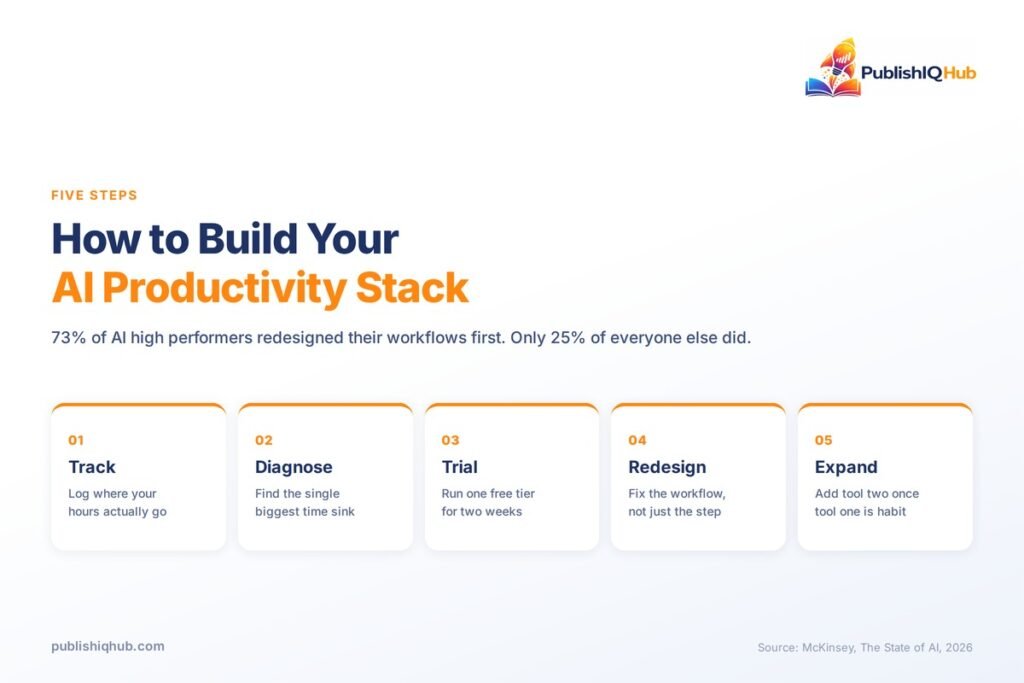
Skip this sequence and you will end up paying for nine subscriptions and using two. The order matters more than the specific AI tools for productivity you end up choosing.
1. Track where your hours actually go for one week. Not where you think they go. Use a simple log — every 30 minutes, one line on what you did. Most people are surprised. The categories that eat the most time are rarely the ones they would have guessed.
2. Pick the single biggest time sink and solve only that. If it is meetings, start with an AI meeting assistant. If it is moving data between systems, start with an AI automation platform. If it is producing content at volume, the answer may sit closer to content syndication and distribution than to another writing tool. One tool, one problem.
3. Run the free tier for two weeks before paying anything. Fathom, Otter, Zapier, Make, and NotebookLM all offer free AI productivity tools substantial enough to prove the concept. A free tier that you stop opening after four days has told you something valuable.
4. Redesign the workflow, not just the step. This is the part almost everyone skips, and the data on it is stark. McKinsey found 73% of AI high performers had fundamentally redesigned workflows, against 25% of everyone else. Bolting AI onto a broken process gives you a faster broken process.
5. Add the second tool only when the first is habitual. If you are not opening tool one without thinking about it, you are not ready for tool two. A working AI productivity stack is built in sequence, never assembled in a single afternoon.
What AI Tools for Productivity Still Cannot Do
This section exists because the honest version of this topic is more useful than the enthusiastic one. Four limits show up repeatedly, and none of them are solved by buying better AI tools for productivity.
Verification takes time that rarely gets counted. Every AI output needs checking, and checking is work. The most striking evidence comes from a randomised controlled trial by METR, where experienced open-source developers using AI tools completed real tasks about 19% slower — while believing afterwards that AI had made them roughly 20% faster. A 39-point gap between felt and measured productivity. METR has since flagged design problems with that study and is rebuilding its methodology, which is worth knowing. But the perception gap it surfaced has not been explained away.
Tool sprawl has a cost you are already paying. Harvard Business Review research from 2022 tracked 137 users across three Fortune 500 companies and found workers toggled between applications roughly 1,200 times a day, losing just under four hours a week — around 9% of their time — simply reorienting. Adding six more applications to that pile does not automatically reduce the number. The best AI tools for work consolidate steps; the rest just add another tab.
Saved time does not convert itself into output. The ECB researchers are blunt about this: time savings only become productivity if workers turn freed hours into extra output. Because only 48.8% of workers reported both using AI and saving time, the economy-wide efficiency gain works out closer to 3.8%.
Your data goes somewhere. Before a meeting tool joins a client call, know your provider’s retention policy. Notion offers zero data retention only on Enterprise. Self-hosted n8n keeps everything in-house. For regulated industries, this is the first question, not an afterthought — the same due diligence that applies when you evaluate AI chatbot platforms for customer-facing work.
Organisational context matters more than your personal setup. Microsoft’s 2026 data found organisational factors account for more than twice the reported AI impact compared with individual effort alone. You can assemble a perfect stack and still be limited by a company that has not changed how work moves.
How to Measure Whether Your AI Tools Are Actually Saving Time
Run this over two weeks. It costs you about five minutes a day, and it is the only way to know whether your AI tools for productivity are earning their keep.
Week one, no new tools. Pick three recurring tasks — writing a client update, preparing a meeting summary, compiling a weekly report. Time each one. Write the number down. Three data points minimum per task.
Week two, tool switched on. Same three tasks, same conditions. Time them again, and this time add a second number: minutes spent reviewing, correcting, or rewriting what the AI produced. That second number is the one everybody forgets, and it is the difference between a real saving and a felt one.
Then compare totals, not impressions. The METR finding is the warning here — people are unreliable narrators of their own productivity. If task time including review has not dropped by at least 20%, the tool is not earning its subscription for that task. It may still earn it elsewhere. Test it there instead of cancelling outright.
One more check worth running at the end: did the saved hours go anywhere useful, or did they quietly fill up again? That answer decides whether your AI productivity tools are a genuine gain or an expensive lateral move.
If you want the shortest possible version of how to use AI to be more productive at work: measure first, change the process second, add the tool third. Almost everyone does it in reverse order and then wonders why the subscription did not pay for itself.
Who Should Skip AI Productivity Tools Entirely
Not everyone needs this. Saying so is unusual in a guide like this one, but the honest answer for some readers is that the best AI tools for work are the ones they do not buy.
People whose work is mostly deep and singular. If your day is one long stretch of concentrated work in a single application — a researcher, a designer, a developer working in one codebase — most AI tools for productivity are solving a coordination problem you do not have. The METR finding lands hardest here.
Teams under ten people with no process problem. If your handoffs already work and nobody is chasing status updates, an AI automation platform is automating something that is not broken. Wait until it breaks.
Anyone in a compliance-heavy role without cleared vendors. If your legal team has not approved a tool, using it on client data is a risk that dwarfs three saved hours. Get the approval first. This is not a formality in financial services, healthcare, or anything touching personal data in the EU or India.
People who have not found their bottleneck yet. Free AI productivity tools are cheap to try, but attention is not. Diagnose before you prescribe.
The Bottom Line on AI Tools for Productivity
Three hours a week is what AI tools for productivity realistically return at the median, and three hours a week is worth having — it is roughly 150 hours a year, which is a month of working days. The people getting substantially more are not the ones with the longest tool list. They are the ones who changed how a process works and then applied AI to the new version of it.
Start narrow. Take the single task that annoys you most this week, find which of the five categories of AI tools for productivity it belongs to, and run one free tier against it for ten working days. Time it honestly, including the review minutes. If the numbers move, keep it and only then consider the second tool.
That is the entire method. It is unglamorous, and it works better than the alternative, which is collecting subscriptions and hoping.
Frequently Asked Questions
What are the best AI tools for productivity in 2026?
The strongest picks by category are ChatGPT and Claude for writing, Granola and Fathom for meetings, Notion and Motion for task management, Perplexity and NotebookLM for research, and Zapier or Make as an AI automation platform. Most people need two or three of these, not all ten.
How much time do AI productivity tools actually save?
ECB research published in August 2026 found the median AI user saves about three hours per week, roughly 7.7% of working time. The distribution is heavily skewed — a small number of users report very large gains, while most see moderate ones. Claims of 20+ hours weekly are outliers, not typical results.
Which AI tool is best for productivity if I can only pick one?
Pick by your biggest time sink. Heavy meeting schedule, choose a notetaker like Fathom, which has an unusually generous free tier. Lots of writing, choose ChatGPT or Claude. Data moving between systems all day, choose Zapier or Make. There is no universal answer, and anyone giving you one is guessing.
Are free AI productivity tools good enough for small teams?
Often, yes. Fathom offers unlimited free recordings and AI summaries, NotebookLM is free, and Zapier and Make both have workable free tiers. A two-person team can run a credible AI stack at zero cost. Paid tiers matter once you need history, integrations, or admin controls.
What is an AI automation platform and do I need one?
An AI automation platform connects your applications and runs multi-step workflows between them without manual handoffs — a form submission becoming a CRM entry, a notification, and a calendar event. You need one if you regularly copy information from one system into another. If your work lives in one or two apps, skip it.
How do I use AI to be more productive at work without hurting quality?
Track review time alongside task time. AI output that takes 10 minutes to generate and 25 to fix has cost you time, not saved it. Use AI for first drafts, summaries, and repetitive transformations. Keep final judgement, client-facing decisions, and anything requiring accountability with a human.