
Quick answer:
The best AI video generation platforms in 2026 depends on the job. Kling AI and Hailuo currently offer the most generous free tiers for testing, Runway and Google Veo 3.1 lead for professional and marketing-grade output, Pika is the strongest free option that still permits commercial use, and HeyGen or Synthesia are the right pick if you need a talking-head avatar rather than a cinematic clip. This guide breaks down 15 platforms — what each does well, what it costs, and which one actually fits your project.
AI video generation has moved from a novelty to a working part of most content teams’ toolkits. Business adoption jumped from 18% in 2023 to 41% in 2025, and text-to-video tools now account for roughly 46% of how that video actually gets made. Whether you’re producing short-form social clips, product demos, or full marketing campaigns, there’s now a genuinely usable ai video generation tool for nearly every budget — including several ai video maker free online options that don’t require a credit card to start.
This guide compares 15 of the best ai video creator platforms live today, split between cinematic clip generators, AI avatar tools, and all-in-one editors, so you can shortlist two or three and test them against your own footage before committing to a paid plan.
How Big Is the AI Video Generation Market in 2026?
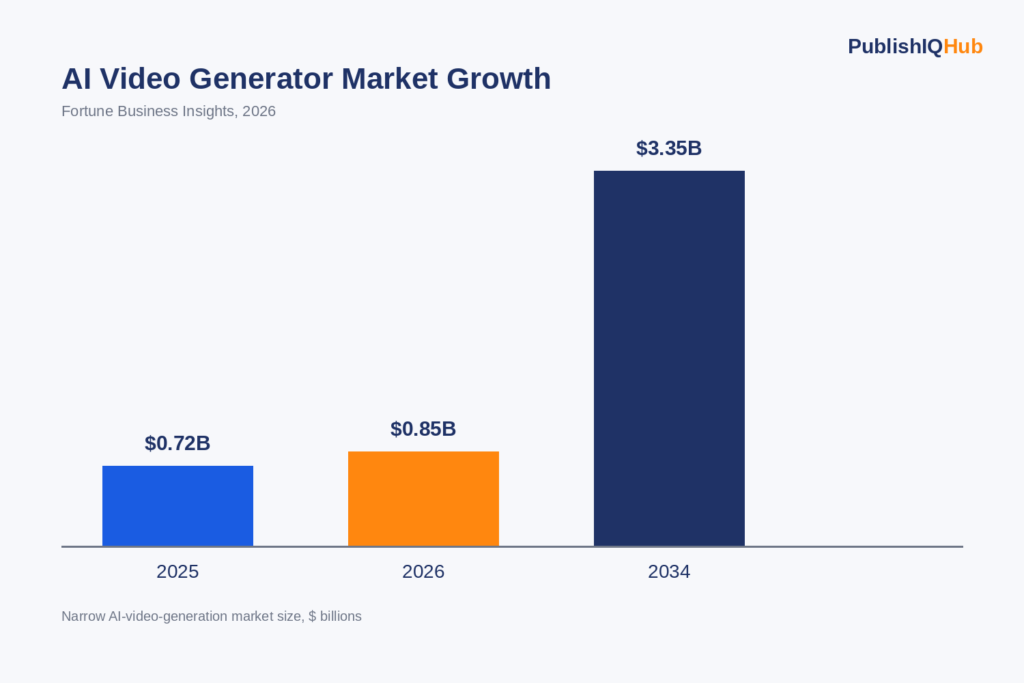
Market researchers don’t fully agree on the exact number — it depends on whether you count pure text-to-video generation alone or bundle in editing and avatar software — but every estimate points the same direction: fast, sustained growth.
- The narrow AI video generator market (generation tools only) is valued at roughly $847 million–$946 million in 2026, projected to reach $3.35 billion by 2034 at an 18.8% CAGR (Fortune Business Insights).
- Grand View Research puts the 2026 figure closer to $946.4 million, growing at a 20.3% CAGR through 2033, with Asia-Pacific holding the largest regional share (Grand View Research).
- Counting the broader category including AI video editing and avatar software, the market is already closer to $3.67 billion, with more than 124 million monthly active users across platforms as of early 2026 (Luma AI).
- Production costs have fallen dramatically: what cost roughly $4,500 per finished minute using traditional production now runs closer to $400, and a 13-day timeline for a 60-second video has compressed to about 27 minutes on some platforms (Luma AI).
That cost collapse is the real story behind the category’s growth — it’s why a genuinely useful free ai video creator now exists at every skill level, from marketing teams to solo creators.
What Counts as “Best” in 2026? Free vs. Paid, Explained
Before the list, it helps to know what actually separates a free ai video maker free online from a paid one, because the gap is wider than it looks on a pricing page.
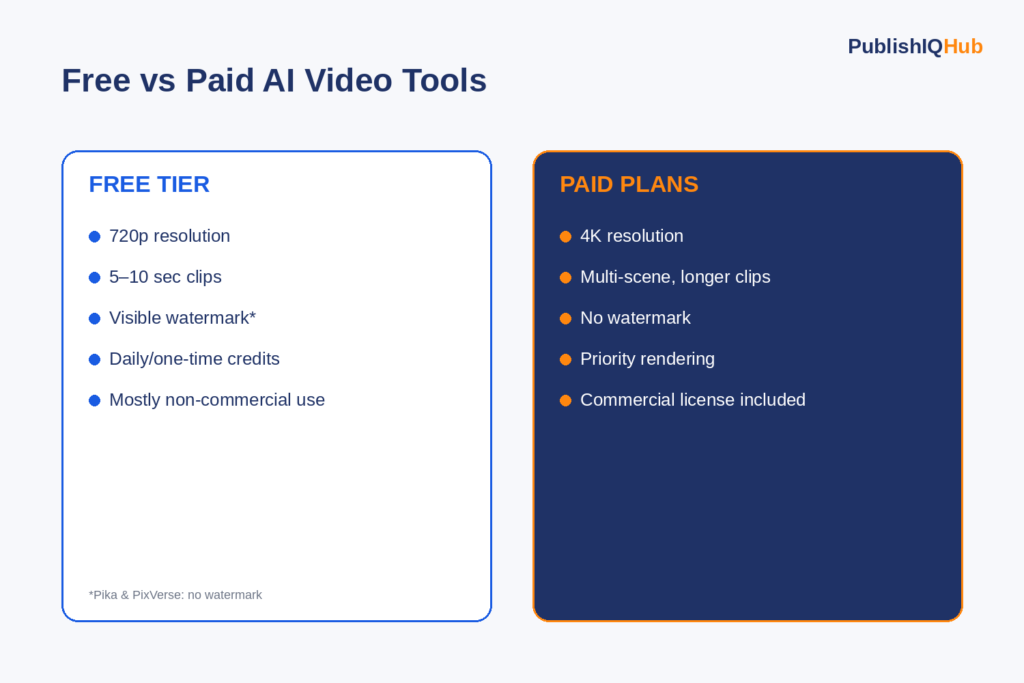
Free tiers in 2026 typically cap out around 5–10 seconds per clip at 720p, add a visible watermark, and either queue you behind paid users during peak hours or limit you to a fixed number of daily credits. Paid tiers unlock 4K exports, multi-scene generation, commercial licensing, and priority rendering — and the resolution gap alone can decide whether a clip is usable for client work.
A few free-tier specifics worth knowing before you pick a platform:
- Kling AI currently offers the most generous daily free allowance of any major platform — 66 credits per day, good for roughly 2–6 short clips depending on resolution.
- Hailuo AI gives new users 200 one-time signup credits (about 8 videos) rather than a daily refresh.
- Pika and PixVerse are two of the only major platforms whose free-tier output carries no visible watermark, and Pika’s free tier is unusual in that it explicitly permits commercial use, though it caps quality at 480p.
- Most other free tiers — Kling, Luma, Runway, Hailuo — restrict free output to non-commercial use only, so read the license terms before publishing anything you made for free.
If you want a deeper breakdown of how conversational AI and automation tools fit into a broader content stack, PublishIQHub’s guide on top AI chatbot companies and platforms is a useful companion read, since many teams now pair AI video with an AI chatbot for a full content-to-conversion funnel.
The 15 Best AI Video Generation Platforms, Compared
| Platform | Best For | Free Tier | Starting Paid Price |
| Google Veo 3.1 | Realistic marketing concepts, native audio | Limited trial credits | Varies by Google AI plan |
| Runway Gen-4.5 | Camera control, generative editing | Free plan available | Standard ~$12/mo |
| Kling AI 3.0 | High-motion scenes, best value | 66 credits/day | ~$7.99/mo |
| OpenAI Sora 2 | Narrative concepting, cinematic mood | No standalone free app | ~$0.10/sec at 720p |
| Luma Dream Machine (Ray3) | Image-to-video, natural motion | Limited trial only | Plus ~$30/moPika 2.5 |
| Pika 2.5 | Fast iteration, free commercial use | Free credits, no watermark | ~$8/mo |
| Hailuo AI (MiniMax) | Best free tier by total credits | 200 signup credits | Pro tier varies |
| PixVerse V6 | Multi-shot generation, native audio | ~50 credits + daily refresh | Credit packs |
| HeyGen | AI avatars, multilingual talking-head | Free trial minutes | From ~$29/mo |
| Synthesia | Corporate training, spokesperson video | Free trial | From ~$18/mo (annual) |
| Higgsfield | Stylized creative effects | Free tier available | Credit-based |
| Seedance 2.0 | Native audio-video generation | Limited free access | Credit-based |
| CapCut | Social-first editing with AI generation | Generous free tier | Pro plan optional |
| InVideo AI | Fully automated marketing videos | Free trial | Paid plans by minutes |
| Creatify | E-commerce and product ad videos | Free trial | Paid plans by credits |
1. Google Veo 3.1
Veo 3.1 is Google’s flagship model, and its biggest advantage is distribution — it reaches YouTube’s audience directly through Shorts, and it now generates synced native audio across all tiers, not just top plans. It’s the strongest pick for realistic marketing concepts and image-to-video workflows where brand accuracy matters.
2. Runway Gen-4.5
Runway remains the go-to for creators who want actual editing control — camera movement, generative inpainting, and character consistency — rather than a single prompt-to-clip pipeline. Its free plan is a genuine on-ramp, and paid tiers scale from a Standard plan around $12/month up to Unlimited generation for studios.
3. Kling AI 3.0
Kling has become the value leader in the category. At roughly $0.07 per second of generated video, it undercuts both Sora and Runway on cost while holding up well on high-motion scenes. Its free tier — 66 credits per day — is currently the most generous daily allowance among major platforms, which makes it a strong pick if you’re testing an ai video generation tool before committing to a subscription.
4. OpenAI Sora 2
Sora 2 is still the reference point for narrative concepting and polished visual mood, particularly for longer, story-driven clips. Its standalone consumer app was shut down in April 2026, so access now runs through OpenAI’s API and ChatGPT integrations rather than a dedicated app — worth knowing if you were expecting a free web tool.
5. Luma Dream Machine (Ray3)
Luma is the strongest option for image-to-video work specifically, with motion that tends to respect physics better than most competitors at a comparable price. It doesn’t offer a permanent free tier — only limited trial access — with its Plus plan starting around $30/month.
6. Pika 2.5
Pika is built for speed. It’s the cheapest entry point for creators who want to iterate on prompts quickly, and its free tier is one of the only ones that both skips the watermark and explicitly allows commercial use — though free output is capped at 480p.
7. Hailuo AI (MiniMax)
Hailuo’s 200-credit signup bonus makes it one of the best free ai video creator options for someone who wants to explore the category without paying anything up front. It’s a strong free tier for testing, though — like most competitors — free output is restricted to non-commercial use.
8. PixVerse V6
PixVerse fits creators who need multi-shot generation, exact first/last-frame control, and optional native audio in the same workflow. Its free tier refreshes credits daily, and testing has shown no visible watermark on free-tier output, which is unusual for the category.
9. HeyGen
HeyGen solves a different problem than the clip generators above — it’s built for AI avatars: talking-head training videos, onboarding content, and localized spokesperson videos in multiple languages. It doesn’t generate cinematic B-roll, so don’t shortlist it against Sora or Runway for that use case.
10. Synthesia
Synthesia is the enterprise-grade counterpart to HeyGen, widely used for corporate training and internal communications at scale. Pricing starts around $18/month on an annual plan for a limited number of minutes, scaling up from there for teams that need more avatars and languages.
11. Higgsfield
Higgsfield leans into stylized, effect-driven output rather than photorealism, making it a good fit for creative and social-first content where a distinct visual style matters more than physical accuracy.
12. Seedance 2.0
Seedance is one of the newer entrants pushing native audio-video generation — sound and motion generated together rather than layered afterward — which is becoming a bigger differentiator across the category in 2026.
13. CapCut
CapCut’s AI video generation features sit inside a broader, genuinely free editing suite, which makes it one of the most practical ai video maker free online options for social media creators who also need captions, trimming, and templates in the same app.
14. InVideo AI
InVideo AI automates the full marketing-video pipeline — script to scene to voiceover — which suits teams that want a finished asset without manually generating and stitching individual clips.
15. Creatify
Creatify is purpose-built for e-commerce and product ad videos, turning a product URL or image catalog directly into ad-ready clips, which makes it a niche but genuinely useful pick for retail and DTC brands.
Why Businesses Are Adopting AI Video Generation Tools
The adoption curve for AI video generation tool usage has moved well past early adopters. A few numbers put the shift in context:
- 78% of marketing teams now use AI-generated video in at least one campaign per quarter, and 73% of Fortune 500 companies have integrated AI video tools into their content workflows (Pictory).
- 51% of marketers now use AI for video creation or editing in some capacity — up sharply from two years ago (Pictory).
- More than 60% of marketers using text-to-video platforms report the technology cuts content creation time by over half, though free tools often lack the fine-grained control needed for brand-specific work (Luma AI).
- IT and telecom represents the largest end-user segment at roughly 34% of the market, while retail and e-commerce makes up about 17.6% and is growing at a 28.4% CAGR (Luma AI).
- Short-form video under 60 seconds now accounts for 67% of all AI-generated video content (Pictory).
That combination — falling cost, rising quality, and a genuinely useful free tier at nearly every price point — is why an ai video generation tool has become a standard line item in marketing, L&D, and product teams’ software stacks rather than an experimental add-on.
How AI Video Generation Actually Works
It helps to understand the mechanics before picking a tool, because the underlying model architecture explains a lot of the quality differences between platforms on this list.
Most 2026-era platforms rely on diffusion models — the same family of AI architecture behind image generators like Midjourney — extended to handle the time dimension of video. The model starts from noise and gradually refines it into coherent frames, guided by your text prompt, a reference image, or a short input clip.
The hardest part isn’t generating a single realistic frame; it’s maintaining temporal consistency, meaning a character’s face, an object’s position, and the lighting of a scene all need to stay stable across dozens or hundreds of frames instead of flickering or warping between them.
By 2026, temporal consistency has improved enough that AI-generated short-form content is often visually indistinguishable from filmed footage to the average viewer — which is part of why platforms are now competing more on workflow features (multi-shot generation, native audio, camera control, character reference) than on raw realism alone.
Trending Questions About AI Video Generation
Search behavior around this topic has shifted noticeably toward conversational, question-based queries — the kind typed into ChatGPT, Gemini, and Claude, or answered directly in a Google AI Overview, rather than typed as short keyword strings. Here are the questions coming up most often, answered directly:
Which AI video generator is best for beginners with no editing experience?
CapCut and Pika are generally the easiest entry points, since both use simple prompt boxes and pre-built templates rather than a full editing timeline. Kling AI’s daily free credits also make it a low-risk way to experiment before learning a more advanced tool like Runway.
Can AI video generation tools create videos with sound built in?
Yes — this has become one of the fastest-moving areas of the category. Google Veo 3.1 now generates synced native audio across all pricing tiers, and Seedance 2.0 was built specifically around generating audio and video together rather than adding sound as a separate editing step.
Do I need a powerful computer to use an AI video generator?
No. Nearly every platform on this list runs entirely in the browser or through a mobile app, with the actual video rendering happening on the provider’s cloud infrastructure rather than your device.
What’s the cheapest way to produce AI video at high volume?
Per-video cost drops significantly with bundled credit plans rather than one-off packs. Kling AI (around $0.07 per second) and Luma’s high-volume Pro tier (around $0.075 per video) are currently among the most cost-efficient options for creators generating dozens of clips per month.
Is AI video generation being used for anything beyond marketing?
How to Choose the Right AI Video Generation Tool
Match the platform to the job rather than chasing the biggest name. A few practical filters:
- Need cinematic B-roll or ad footage? Start with Google Veo 3.1, Runway Gen-4.5, or Kling AI 3.0.
- Need a talking-head or spokesperson video? HeyGen and Synthesia solve this; clip generators don’t.
- Need to test before paying anything? Kling’s daily free credits and Hailuo’s signup bonus are currently the most generous.
- Need free output you can actually publish commercially? Pika is the clearest option, since most competitors restrict free-tier use to non-commercial testing.
- Need volume for e-commerce or social? CapCut, Creatify, and InVideo AI are built around production speed rather than single-shot cinematic quality.
If your team is also weighing where AI fits into the broader marketing stack, PublishIQHub’s breakdown of AI-based digital marketing and AI automation in 2026 covers how video generation typically slots into a larger workflow alongside content and campaign automation.
Frequently Asked Questions
What is the best free AI video generator in 2026?
For output quality on a free tier, Kling AI 3.0 and Luma’s Ray3 model currently produce the most realistic motion. For total free volume, Hailuo AI’s 200-credit signup bonus goes further than most daily-credit competitors. For beginners who want a simple interface with no visible watermark, Pika and PixVerse are the easiest starting points.
Is there a truly free AI video generator with no watermark?
Yes, but options are limited. Pika and PixVerse are currently the two major platforms whose free-tier output has no visible watermark in independent testing, though both still cap resolution and clip length compared to paid plans.
How does AI video generation actually work?
Most modern tools use diffusion-based models trained on large video datasets to generate frames from a text prompt, image, or short video reference, then stitch those frames into a coherent clip while maintaining “temporal consistency” — keeping characters and backgrounds stable from frame to frame.
Can I use AI-generated video for commercial projects?
It depends entirely on the platform and the specific tier you’re on. Paid plans almost always include a commercial license; free tiers usually restrict use to personal or testing purposes, with Pika’s free tier being a notable exception. Always check the license terms on the platform’s own pricing page before publishing.
What’s the difference between an AI video generator and an AI avatar tool?
A clip generator like Runway, Kling, or Veo creates cinematic scenes, B-roll, or effects from a prompt. An avatar tool like HeyGen or Synthesia generates a talking-head presenter reading a script — useful for training, onboarding, and spokesperson content, but not for generating scenery or action shots.
Looking for more AI tool comparisons for your business? See PublishIQHub’s guides on best AI software development companies and top AI chatbot companies and platforms.