Quick Answer:
The best AI powered research tool depends on your sources. Elicit, Consensus and Scite lead for academic papers. ChatGPT deep research, Perplexity, Gemini Deep Research and Claude Research handle broad web research. Julius AI covers data analysis, and AlphaSense serves financial research. Whatever you pick, verify every citation before you rely on it.
A few years ago, a literature review meant a weekend inside a library database and a spreadsheet full of half-read abstracts. Now a grad student in Ohio can type one question, wait four minutes, and get a twenty-page report with footnotes. That’s the promise of every AI powered research tool on the market right now, and it’s why “AI tools for research” has become one of the most-asked questions on ChatGPT, Gemini and Google’s AI Overviews.
Some of them deliver on it. Others invent sources with total confidence.
The shift isn’t hype, either. In a Pew Research Center survey fielded in early 2025, 34% of U.S. adults said they had used ChatGPT, roughly double the 2023 share. Among adults under 30, it was 58%. And 26% of all U.S. adults said they had used it to learn something new, up from just 8% in March 2023.
Researchers moved even faster. Wiley’s ExplanAItions 2025 study of 2,430 researchers found AI use jumped to 84%, up from 57% the year before.
So who’s actually switching to AI research tools? Pretty much anyone who reads for a living:
- Students and academics screening hundreds of papers for one thesis chapter
- Market researchers sizing up competitors before a pitch meeting
- Analysts working through earnings calls and SEC filings
- Marketers and content teams building briefs (a lot of the same teams already use AI tools for marketing that actually work)
This guide covers what an AI powered research tool actually does, which of the best AI research tools are worth paying for, and how to avoid the mistakes that get people burned.
What Is an AI Powered Research Tool?
An AI powered research tool is software that uses large language models to find, read, summarize and analyze sources for you, usually with citations that link back to the original material.
That last part is the whole game. A general chatbot answers from what it absorbed during training. A research tool goes out, pulls documents (papers, web pages, filings, your own uploads) and builds its answer on top of them.
Think of it this way. A chatbot is a smart friend talking from memory. An AI research assistant is a smart friend actually holding the book open.
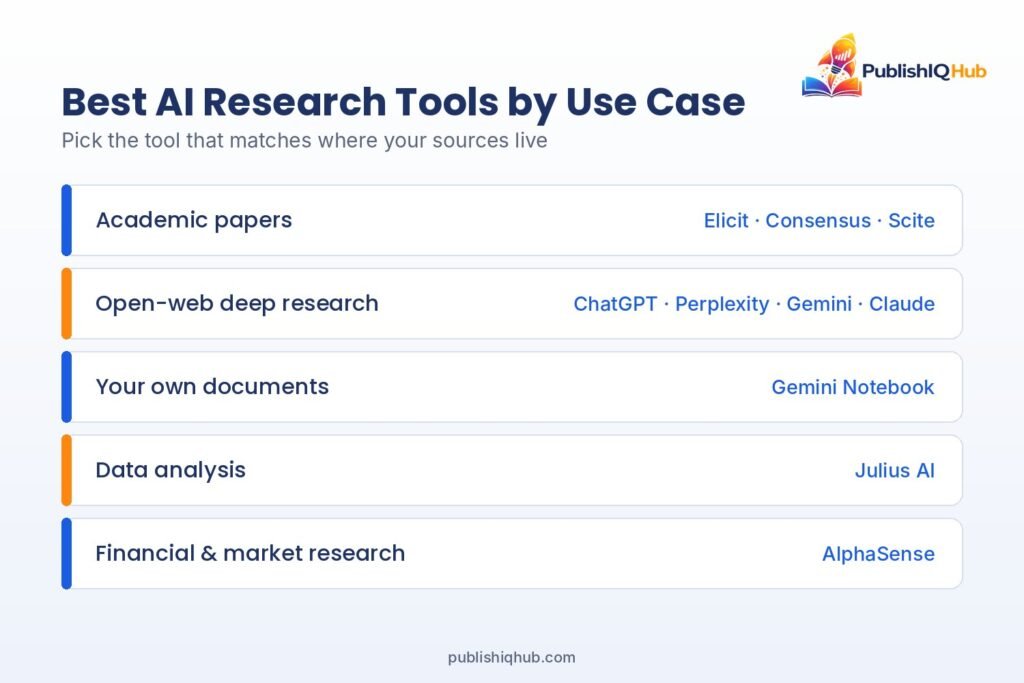
Most AI tools for research fall into five groups:
- Academic search engines that work with peer-reviewed papers
- Deep research agents that browse the open web for several minutes per question
- Source-grounded notebooks that only read what you upload
- Data analysis assistants that run code on your spreadsheets
- Financial and market intelligence platforms built on filings and transcripts
How Do AI Research Tools Work?
Under the hood, nearly all AI research tools run the same four-step loop.
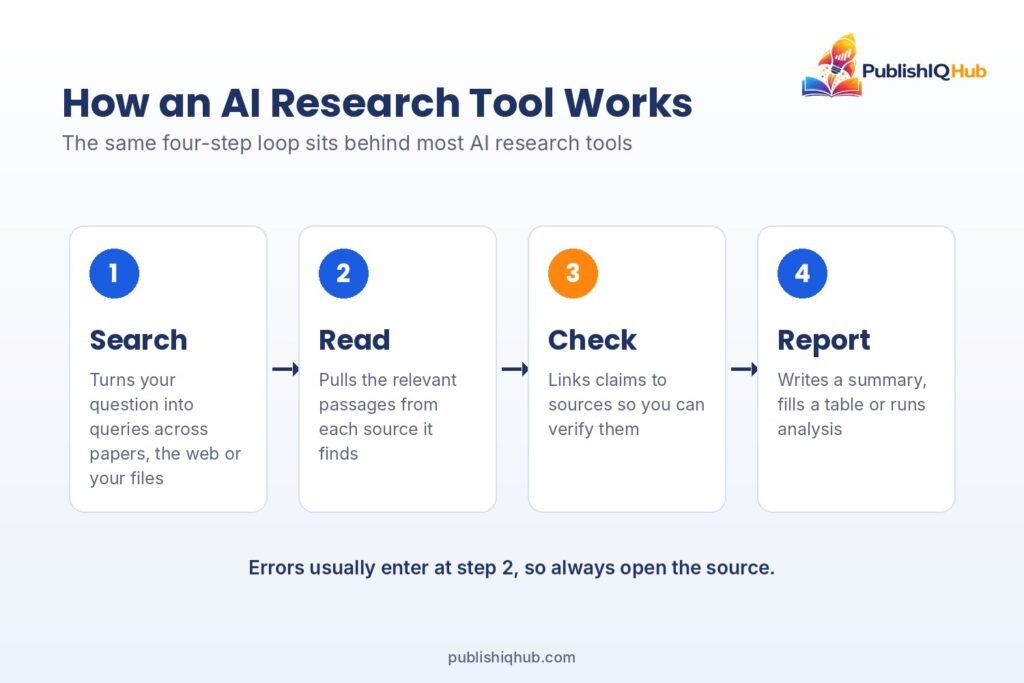
1. Search and retrieval. The tool turns your question into a batch of search queries. Academic tools query paper databases; Elicit says its free plan searches more than 138 million papers. Deep research agents hit the open web instead, often running dozens of searches back to back.
2. Reading and summarization. The model reads what came back and pulls out the relevant parts. Good tools show you which passage supports each claim. Weak ones paraphrase so loosely you can’t trace anything.
3. Citation checking. This is where tools really split apart. Scite, for example, shows whether later papers supported or contrasted a study’s findings. Most general chatbots don’t check this at all.
4. Analysis and output. Finally, the tool writes a report, fills a comparison table or runs code. AI tools for data analysis, like Julius AI, run calculations on your uploaded data and return charts.
Here’s the catch. Step two is where errors sneak in, and the final report rarely tells you which sentences are shaky. More on that below.
Best AI Research Tools in 2026, by Use Case
Every price below was checked in October 2026 against the vendor’s own pricing page, or against the closest reliable listing where the vendor doesn’t publish one. Prices move often, so confirm before you buy.
Best AI Research Tools in 2026, by Use Case
1. Elicit
- What it does: Searches academic literature, screens papers against criteria you set, and extracts details like sample size, methods and findings into a table.
- Best for: Systematic reviews, and anyone comparing dozens of studies side by side. It’s one of the most capable AI literature review tools available.
- Pricing: Free Basic plan with unlimited search. Paid tiers start at $11 per user per month on annual billing (Elicit’s pricing page currently shows more than one price set, so check yours at checkout).
- Honest limitation: The free plan caps Research Agent and report usage. Heavy reviewers hit that wall quickly.
2. Consensus
- What it does: An AI search engine for research papers that answers plain-English questions (“Does creatine help memory?”) by summarizing what published studies found.
- Best for: Fast evidence checks, students, and health or science writers who want an AI research assistant that sticks to published studies.
- Pricing: Free plan available. Pro is listed at $10 a month and Deep at $45 a month, both billed annually.
- Honest limitation: A neat summary of “what studies say” can flatten real disagreements, especially in fields where study quality varies a lot.
3. Scite
- What it does: Shows how a paper has been cited by later research: supporting, contrasting, or just mentioning it.
- Best for: Pressure-testing a study before you build an argument on it.
- Pricing: No free plan, but a 7-day free trial. Basic runs $20 a month and Pro $50 a month, billed yearly.
- Honest limitation: Its value depends on access to full text, so coverage can be thinner for some paywalled journals and niche fields.
Best AI Deep Research Tools for the Open Web
These are the AI deep research tools everyone keeps asking about. You hand them a question, they browse for several minutes, and they return a long report with links.
4. ChatGPT deep research (OpenAI)
- What it does: Runs multi-step web research and writes a cited report.
- Best for: Broad business, policy or “explain this industry” questions where you want a fast first map.
- Pricing: Limited deep research on the Free plan; expanded deep research on Plus at $20 a month.
- Honest limitation: The reports read so polished that weak sources are easy to miss. Click the links. Every time.
5. Perplexity
- What it does: An answer engine that cites sources inline for every response, with deeper research on paid tiers.
- Best for: Quick fact-finding and anything tied to recent news.
- Pricing: Free Standard plan. Pro is $20 a month, Max is $200 a month, and verified students can get Education Pro for $10 a month.
- Honest limitation: It sometimes leans on SEO-driven blogs over primary sources. Fix that by asking for “.gov, journal or company filing sources only.”
6. Gemini Deep Research (Google)
- What it does: Builds a research plan, browses the web, and compiles a multi-page report.
- Best for: People who already live inside Google’s apps.
- Pricing: Included on Google’s free tier. Google AI Plus is $4.99 a month and Google AI Pro is $19.99 a month for higher limits.
- Honest limitation: Reports can run long without getting more useful. Ask for a word cap.
7. Claude Research (Anthropic)
- What it does: Searches the web and any tools you’ve connected, then writes a cited answer.
- Best for: Long, careful write-ups and comparing many documents at once.
- Pricing: Not on the Free plan. Included with Pro at $20 a month ($17 a month billed annually) and with Max, from $100 a month.
- Honest limitation: No free access to Research, so you’ll need to pay before you can test it properly.
Best Source-Grounded Research Notebook
8. Gemini Notebook (the tool many people still know as NotebookLM)
- What it does: Reads only the sources you add (PDFs, docs, links) and answers questions about them, like a free AI research assistant for your own files.
- Best for: Students working through course readings and analysts working from a fixed set of reports.
- Pricing: Available on Google’s free tier, with higher limits on paid Google AI plans.
- Honest limitation: It won’t go find new material. If your source set is lopsided, so are the answers.
Best AI Tools for Data Analysis
9. Julius AI
- What it does: Lets you upload spreadsheets or connect data, ask questions in plain English, and get charts and statistics back.
- Best for: Survey results, sales exports, and quick analysis. It’s one of the easier AI tools for data analysis if you don’t code.
- Pricing: Free plan with daily credits. Plus is $20 a month ($16 billed yearly) and Pro is $45 a month.
- Honest limitation: You still need enough stats knowledge to catch a wrong test. It’ll happily run the wrong analysis if you ask for it.
Best AI Tools for Market Research and Financial Research
10. AlphaSense
- What it does: AI search across SEC filings, earnings call transcripts, expert call transcripts, and equity research from more than 1,000 sell-side and independent firms.
- Best for: Equity analysts, corporate strategy teams and consultants doing market sizing.
- Pricing: Not published. Annual subscriptions are sold through the sales team.
- Honest limitation: The price puts it out of reach for most individuals and small teams.
On a smaller budget, plenty of U.S. teams use cheaper AI tools for market research, pairing Perplexity or ChatGPT deep research with their own first-party data. If that’s your setup, our guide to the best customer analytics platforms covers the other half of the job.
One note on stock research. These tools summarize information that already exists. They can’t tell you what a share price will do next, and they’re no substitute for a licensed advisor.
AI Research Tools Comparison Table
Here’s how the ten AI research tools above compare side by side.
| Tool | Best for | Free plan | Starting paid price | Citations |
| Elicit | Systematic reviews | Y | $11/user/mo (annual) | Y |
| Consensus | Quick evidence checks | Y | $10/mo (annual) | Y |
| Scite | Citation context | N (7-day trial) | $20/mo (annual) | Y |
| ChatGPT deep research | Broad web research | Y | $20/mo (Plus) | Y |
| Perplexity | Fast cited answers | Y | $20/mo (Pro) | Y |
| Gemini Deep Research | Google users | Y | $4.99/mo (AI Plus) | Y |
| Claude Research | Long-form synthesis | N | $20/mo (Pro) | Y |
| Gemini Notebook | Your own documents | Y | $4.99/mo (AI Plus) | Y |
| Julius AI | Data analysis | Y | $20/mo (Plus) | N (shows its analysis) |
| AlphaSense | Financial research | N | Contact sales | Y |
How to Choose the Right AI Powered Research Tool
The best AI research tools for one person can be useless for another. Skip the feature lists for a minute and run through this checklist instead:
- Where do your answers live? Peer-reviewed journals point to an academic tool. The open web points to a deep research agent. Your own files point to a notebook. Filings point to a financial platform.
- Can you click through to the exact passage? Not the homepage. The passage.
- Does it admit when it doesn’t know? A tool that never says “I couldn’t find this” is a red flag.
- What happens to your uploads? Check whether your data trains the model, especially with client, patient or student information.
- Can you export? Tables to CSV, reports to Docs or Word. Copy-pasting from a chat window gets old fast.
- What does it cost per week of real use? A $20 tool you use daily beats a $200 one you open twice a month.
Then do the one test that matters most. Pick a topic you already know cold, run the same question through two or three tools, and see which one gets it wrong. Five minutes, and you’ll learn more than any review can tell you.
Most people end up with a small stack of AI tools for research rather than one tool. An AI powered research tool, a writing assistant (see our roundup of the best AI-powered writing tools, free and paid), and a few AI tools for productivity that save time on the admin side.
Is AI Reliable for Research? How to Use It Without Getting Burned
Short version: an AI research assistant is reliable for finding sources and unreliable as a final source.
The numbers here are sobering. In a study published in JMIR Mental Health in November 2025, Deakin University researchers had GPT-4o write six literature reviews and then checked all 176 citations. Of those, 19.9% were completely fabricated. Among the real ones, 45.4% contained errors.
Researchers have noticed. In the same Wiley survey, 64% of researchers said they were concerned about hallucinations and inaccuracies, up from 51% a year earlier.
So adoption of AI research tools is climbing and trust is falling at the same time. That’s not a contradiction. It’s people learning how these tools fail.
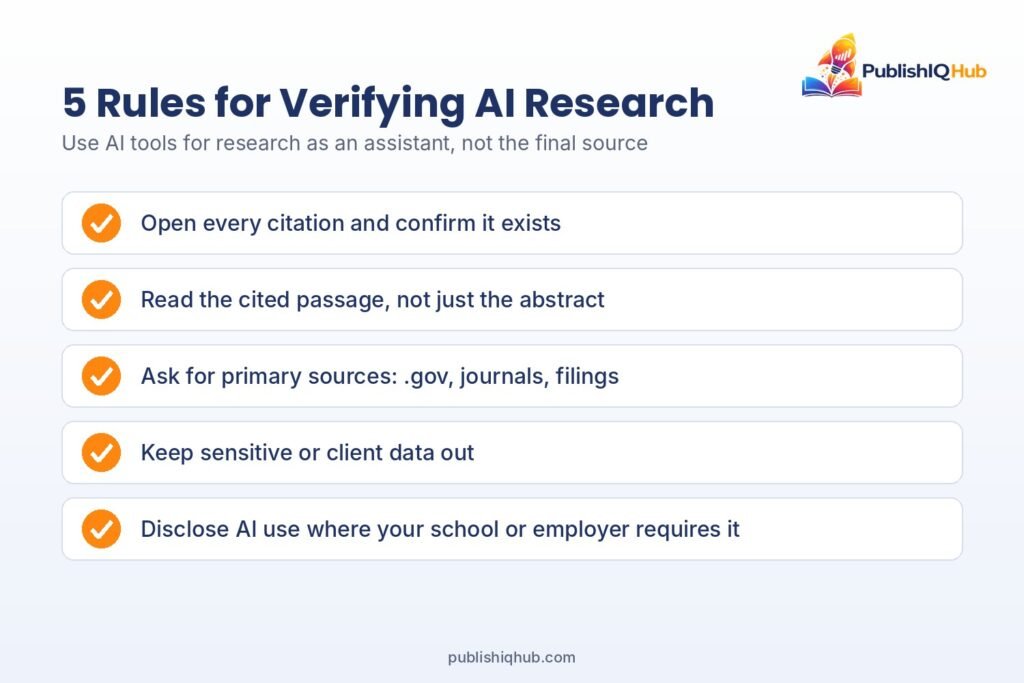
Five rules keep your AI tools for research honest:
- Open every citation. Confirm the paper or page exists and that it says what the AI claims it says.
- Read the passage, not just the abstract. Summaries drop the caveats that matter most.
- Ask for primary sources. Government data, peer-reviewed journals and company filings beat blog posts.
- Keep sensitive data out unless the tool offers business-grade privacy controls you’ve actually checked.
- Disclose AI use where your school, journal or employer requires it.
If your team wants a more formal approach, NIST’s AI Risk Management Framework is a solid, free starting point for setting internal rules. And since search engines themselves now answer questions with AI summaries, it’s worth understanding how AI Mode in Google picks its sources too.
The Bottom Line
The right AI powered research tool won’t do your thinking for you. It’ll do your digging. Of all the AI tools for research covered here, pick one that fits your sources, test it on something you already know, and check every citation before it goes anywhere near a final draft. Used that way, the best AI research tools can save you hours every week.
Want more practical breakdowns like this one? Browse the latest guides on PublishIQHub, where we cover AI tools, B2B trends and finance in plain English.
Frequently Asked Questions
What is the best AI tool for research?
There isn’t one best AI powered research tool for everyone. Elicit is the strongest pick for academic literature reviews, Perplexity is the fastest for cited web answers, and ChatGPT deep research or Claude Research work well for long reports. Match the tool to where your sources live.
What is the best free AI tool for research?
Perplexity’s free plan, Gemini Deep Research on Google’s free tier, and Elicit’s free Basic plan are the most useful free AI research tools right now. Consensus also has a free plan for quick evidence checks. Free tiers come with usage caps, so heavy users usually upgrade.
Which AI is best for academic research?
Among AI tools for academic research, Elicit, Consensus and Scite are built specifically around peer-reviewed papers. Elicit is best for screening and data extraction, Consensus for quick answers about what studies found, and Scite for checking how a paper has been cited since.
Can AI do a literature review for me?
AI literature review tools can speed up the search, screening and summary stages a lot. It can’t replace your judgment on study quality, and it can invent references. A 2025 JMIR Mental Health study found nearly one in five GPT-4o citations was fabricated, so check every source yourself.
Is ChatGPT deep research better than Perplexity?
They solve different problems. Perplexity is quicker and better for short, cited answers. ChatGPT deep research takes longer but produces a fuller report. Many researchers use Perplexity to scope a topic and a deep research agent for the full write-up.
Is AI reliable for research?
AI research tools are reliable for finding and summarizing sources, not for being the source. Wiley’s 2025 survey found 64% of researchers worried about hallucinations. Treat every output as a draft that needs fact-checking.
How do I check if AI citations are real?
Search the exact title in Google Scholar or the publisher’s site, confirm the authors and year match, and read the cited passage. Tools like Scite can also show how a paper has been cited. If you can’t find it in two minutes, assume it’s fake.
Are AI tools for market research worth paying for?
For occasional projects, a $20-a-month deep research plan is usually enough. Teams that analyze filings, earnings calls or expert interviews every week tend to get more from a dedicated platform like AlphaSense, though pricing is set by sales.