Ranked for quality, pricing, and commercial licensing — a buyer’s guide for marketers, designers, and growing businesses.
Quick answer: For most businesses, Nano Banana Pro (Google) and Adobe Firefly are the safest starting points in 2026 — Nano Banana Pro for speed and character consistency, Firefly for IP-safe commercial licensing. Midjourney V7 still wins on pure artistic quality, Canva AI and Bing Image Creator are the best free entry points for small teams, and Stable Diffusion remains the top pick for anyone who wants full control over the model itself.
Why AI Image Generation Tools Are a Business Decision Now
Two years ago, an AI image generation tool was something marketing teams experimented with on the side. In 2026, it’s closer to a standard line item in the content budget. Ecommerce teams generate product photography without booking a studio. Agencies storyboard campaigns before a single dollar goes to production. Publishers illustrate articles on deadline instead of waiting on stock licenses.
The shift shows up in the numbers. The global AI image generator market grew from roughly $349.6 million in 2023 toward a projected $1.08 billion by 2030, expanding at a compound annual growth rate near 17.7%, according to Grand View Research. Other estimates show even faster momentum — Fortune Business Insights puts the market at $484.29 million in 2026, on track to reach $1.75 billion by 2034, with North America holding roughly 40% of global share.
Usage backs up the growth: more than 150 million people now use AI image generators every month, together producing an estimated 80 million images a day, according to sqmagazine’s 2026 tracking. On the demand side, 62% of marketers already use generative AI for image creation, and AI-generated product imagery in fashion ecommerce is converting roughly 60% better than traditional photography, per AutoFaceless’s 2026 industry data.
For a buyer, more tools means more decisions, and most existing comparison lists don’t help much since they go stale within weeks or read like an affiliate pitch for a single platform. Which platform holds up for commercial use without licensing risk? Which one is fast enough for high-volume ad testing? Which one is worth $20 a month versus $120? This guide ranks 12 of the most-used AI image generation companies in 2026, with a straight look at pricing, commercial licensing, and where each tool genuinely wins — similar to the evaluation process we run for clients when scoping AI-powered digital marketing workflows more broadly.
The 12 Best AI Image Generation Tools for 2026
Every entry below covers what the tool is best at, its starting price, and the one feature that sets it apart — not a marketing description of what it claims to do. The list mixes flagship models from Google, OpenAI, and Adobe with smaller, more specialized platforms, because the ‘best’ AI image generator for a five-person startup rarely matches the best one for an enterprise brand team. Rankings are based on a combination of current pricing, licensing terms, and third-party benchmark data rather than a single team’s subjective preference.
1. Nano Banana Pro (Google Gemini)
Google’s flagship image model, launched in early 2026, folds Gemini’s reasoning into fast image generation with strong consistency across a character, product, or scene when it’s generated more than once — a common failure point for older tools. It replaced Google’s earlier Flash-based models by combining the depth of the ‘Pro’ line with near-instant response times, which is why performance marketing teams have adopted it quickly for high-velocity ad testing.
Best for: UGC-style ad creative and multi-image brand consistency.
Pricing: Free inside the Gemini app; paid usage through Google AI subscriptions.
Standout feature: Independent testing from CNET ranks it at the top of 2026 benchmarks for UGC ad creatives and character consistency.
2. Midjourney V7
Still the aesthetic benchmark for AI-generated art. Output leans painterly and moody, with a distinctive look that’s hard to replicate elsewhere. The web app is finally replacing the old Discord-only workflow, though the interface still feels less streamlined than newer, purpose-built platforms.
Best for: Brand campaigns, editorial art, and concept work where style matters more than literal accuracy.
Pricing: Roughly $10 to $120 per month depending on generation volume.
Standout feature: Unmatched stylistic range, though photorealism and in-image text rendering remain weaker than newer competitors.
3. Adobe Firefly (Image Model 5)
Firefly is trained exclusively on licensed Adobe Stock content and public domain material, which makes it the tool most brand and legal teams reach for when licensing risk is the top concern. It integrates directly into Photoshop and Illustrator, so output can move straight into an existing production pipeline instead of living as a separate export.
Best for: Enterprise and agency teams that need commercial output with minimal IP exposure.
Pricing: Bundled into Creative Cloud plans, with standalone tiers also available.
Standout feature: The only major generator marketed as fully IP-safe for commercial production work.
4. GPT Image 2 (OpenAI)
OpenAI’s current image model, built directly into ChatGPT. It trades some creative range for reliability and an extremely short learning curve.
Best for: Teams that already run content workflows inside ChatGPT and want images without switching tools.
Pricing: Included with ChatGPT Plus and Team plans, plus separate API pricing.
Standout feature: Rated the easiest AI image generator to use in independent Arena.ai and Zapier evaluations.
5. Leonardo.ai
A full creative suite rather than a single model — Leonardo adds Image Guidance and a Realtime Canvas that generates as you sketch, plus built-in upscaling.
Best for: Designers who want compositional control, not just a text box.
Pricing: Free tier available; Pro plans start around $30 per month.Standout feature: Ultra Quality upscaling to 4K and ‘Fast’ generation tokens that return results in under
6. Ideogram 3.0
Ideogram’s specialty is legible, accurately spelled text inside generated images — a problem most other tools still struggle with.
Best for: Marketing assets that need real, readable typography: posters, signage, packaging mockups, logos.
Pricing: Free tier with paid credit packs for higher volume.
Standout feature: The most reliable in-image text rendering among mainstream generators.
7. Recraft V4 Pro
Recraft looks and feels more like Figma than a typical prompt box — an expanding canvas holds every generation, with editing tools layered on top.
Best for: Brand and product designers producing vector-style assets, not just raster images.
Pricing: Credit-based subscription tiers.
Standout feature: Combines vector and raster output in one workspace, with mockup and short-video extensions built in.
8. Stable Diffusion (via DreamStudio / API)
The open-source model family behind much of the category. It can be self-hosted, fine-tuned on custom data, or accessed through Stability AI’s hosted tools — DreamStudio alone generates roughly 2 million images a day.
Best for: Technical teams that want a custom-trained model or full control over deployment.
Pricing: Pay-per-generation API credits, or free if self-hosted on your own infrastructure.
Standout feature: The only major option offering true model customization and fine-tuning.
9. Canva AI (Magic Media)
Image generation built directly into Canva’s existing design workflow, so results drop straight into a template instead of a separate export-import step.
Best for: Small businesses and social media teams without a dedicated designer.
Pricing: Included in Canva Pro, roughly $13 per user per month.
Standout feature: Zero learning curve for anyone who already uses Canva.
10. Freepik AI Suite
Budget-friendly access to leading open models bundled alongside Freepik’s stock asset library, aimed at teams generating high volumes of lower-stakes content.
Best for: Cost-conscious teams that need volume over polish.
Pricing: Low-cost credit packs, generally cheaper per image than subscription-first tools.
Standout feature: Strong price-to-performance ratio for bulk content needs.
11. Bing Image Creator
Microsoft’s free, DALL-E-based generator, built into Copilot and Edge with no separate signup required for Microsoft account holders.
Best for: Casual or first-time users testing whether AI image generation fits their workflow at all.
Pricing: Free.
Standout feature: Zero cost and zero setup — the lowest-friction way to try the category.
12. DeeVid AI
A workflow-first tool rather than a single model bet — it combines text-to-image generation, image-to-image restyling from an uploaded reference, and video extension in one pipeline.
Best for: Teams that need both a still image and a short video cut from the same creative asset.
Pricing: Subscription with credit-based tiers.
Standout feature: Keeps generation, editing, and video output together instead of stitching separate tools.
AI Image Generation Tool Comparison
A side-by-side view of pricing and licensing across the ten most commonly evaluated options, useful for a quick shortlist before a deeper trial.
| Tool | Best For | Starting Price | Commercial License | Standout Feature |
| Nano Banana Pro | UGC ad creative, consistency | Free (Gemini app) | Yes | Character/product consistency across images |
| Midjourney V7 | Artistic, brand campaigns | $10/month | Yes (paid plans) | Best-in-class aesthetic quality |
| Adobe Firefly | Enterprise, legal safety | Creative Cloud tiers | Yes, licensed data | Fully licensed training data |
| GPT Image 2 | Beginners, ChatGPT users | ChatGPT Plus bundle | Yes | Simplest chat-to-image workflow |
| Leonardo.ai | Designers, fine control | Free / $30/month | Yes (paid plans) | Realtime Canvas, 4K upscaling |
| Ideogram 3.0 | Text/typography in images | Free / paid credits | Yes (paid plans) | Most legible in-image text |
| Recraft V4 Pro | Vector & brand assets | Credit-based tiers | Yes (paid plans) | Vector + raster in one canvas |
| Stable Diffusion | Custom / self-hosted models | Pay-per-credit API | Depends on license | Full model customization |
| Canva AI | Small teams, social content | Canva Pro (~$13/mo) | Yes (paid plans) | Built into design templates |
| Bing Image Creator | Free casual use | Free | Limited | No-cost entry point |
| Freepik AI Suite | Cost-conscious, high volume | Low-cost credit packs | Yes (paid plans) | Best price-to-performance ratio |
| DeeVid AI | Image-to-video workflows | Subscription tiers | Yes (paid plans) | Generation, editing & video in one pipeline |
What’s Changed in AI Image Generation Since Last Year
Three shifts explain most of the movement in this year’s rankings compared to 2025. First, latency dropped sharply — tools that once took 30 to 60 seconds per image now routinely return results in under 10 seconds, which is what unlocked the high-volume ad-testing use case in the first place.
Second, character and product consistency improved enough that generating the same subject across multiple images or angles is no longer a coin flip, closing one of the biggest gaps between AI generation and traditional photography for catalog and campaign work.
Third, licensing has become a genuine differentiator rather than fine print — enterprise buyers increasingly ask about training data provenance before signing a contract, which is why Adobe Firefly’s licensed-only approach has gained ground against tools with more permissive quality but murkier data sourcing.
These shifts also explain why ‘artificial intelligence images generator’ searches increasingly pair with commercial and legal qualifiers — buyers researching the category today are asking not just what a tool can produce, but whether they’re allowed to use it, and what happens if a competitor’s output looks suspiciously similar to their own.
How to Choose the Right AI Image Generator for Your Business
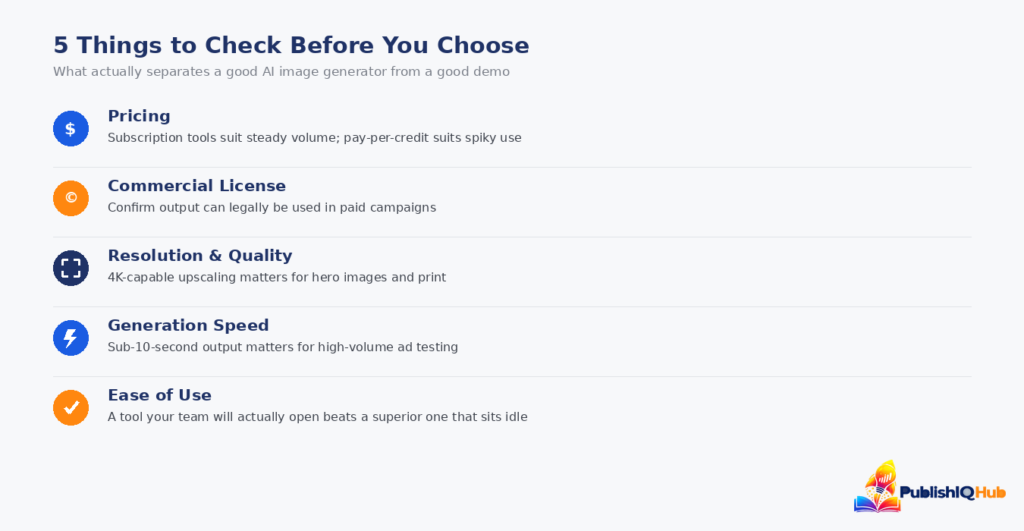
The ‘best’ AI image generation tool depends entirely on what it needs to do inside your workflow. A solo creator testing concepts for a portfolio has almost nothing in common with a retail brand generating thousands of product variants a month, and pricing a tool by its sticker price alone tends to miss the real cost driver, which is usually volume, revision cycles, and licensing risk rather than the monthly subscription fee itself. Five criteria decide the right fit in practice:
Pricing model. Subscription tools (Midjourney, Leonardo, Canva) suit predictable monthly volume; credit-based API tools (Stable Diffusion, Freepik) suit spiky or high-volume use where you only want to pay per image.
Commercial license terms. Confirm the tool’s output can legally be used in paid campaigns and that the training data itself doesn’t create downstream IP exposure — Adobe Firefly is built specifically around this concern.
Resolution and quality. Hero images and print assets need 4K-capable upscaling (Leonardo, Recraft); social and ad testing volume can run on lower-resolution, faster output.
Generation speed. Performance marketers running dozens of ad variations a day need sub-10-second generation (Nano Banana Pro, Leonardo’s Fast tokens) — waiting minutes per image erases the cost advantage.
Ease of use. A tool the team will actually adopt beats a technically superior one nobody opens. GPT Image 2, Canva AI, and Bing Image Creator all optimize for this over raw creative control.
Teams already running conversational AI or chatbot tools for customer-facing workflows tend to gravitate toward image generators with the same low-friction, chat-style interface — GPT Image 2 and Nano Banana Pro both fit that pattern.
The Bottom Line
There isn’t a single best AI image generation tool in 2026 — there’s a best tool for a specific job. Nano Banana Pro and Adobe Firefly cover most commercial use cases safely; Midjourney still wins on pure creative range; Canva AI and Bing Image Creator remove the barrier to entry entirely; and Stable Diffusion remains the only real option once a team needs a model trained or hosted on its own terms.
The right move is matching the tool to the volume, budget, and licensing tolerance of the campaign at hand, rather than defaulting to whichever platform is loudest this quarter.
Most teams end up running two tools rather than one: a fast, low-cost generator for high-volume testing and iteration, paired with a licensed, higher-quality tool for anything that ships in a paid campaign or a client-facing deliverable.
That combination — rather than a single ‘winner’ — is what most of the 2026 market data above is actually describing: not one dominant platform, but a fast-growing category where the right stack depends on what a business is trying to produce, how often, and at what level of legal risk it’s willing to accept. For teams building out a broader AI-driven content stack, this pairs naturally with decisions around AI automation across the business — visual generation is rarely a standalone tool choice anymore.
Frequently Asked Questions
What is the best free AI image generator in 2026?
Bing Image Creator and Canva AI’s free tier are the most accessible no-cost options for casual use. Nano Banana Pro is also free inside the Gemini app and currently ranks ahead of both on quality benchmarks, which makes it the strongest starting point for anyone who wants free access without stepping down to a noticeably weaker model.
Which AI image generator is most realistic?
Nano Banana Pro and GPT Image 2 currently lead third-party realism benchmarks, particularly for product and UGC-style shots. Midjourney V7 remains stronger for stylized or artistic realism rather than photojournalistic accuracy
Can I use AI-generated images for commercial use?
Most paid plans across the tools in this guide include a commercial-use license, but the terms vary by how the underlying model was trained. Adobe Firefly is the clearest choice when licensing risk is the priority, since it’s trained only on licensed and public domain content — always check a tool’s current terms of service before using output in paid campaigns.
What is the best AI image generator for ecommerce product photos?
Nano Banana Pro and Leonardo.ai both handle product consistency well across multiple generations, which matters for catalog and variant images. Adobe Firefly is the safer pick when licensing certainty matters more than raw speed.
Are AI image generation tools safe from copyright claims?
Risk varies by tool. Models trained on licensed or public domain data (Adobe Firefly) carry the lowest exposure. Open or broadly scraped models carry more legal uncertainty, which is worth weighing against cost savings for any business using output in paid or public-facing campaigns.